
One mushaf
for your halaqa, your family and your hifz
Whether you teach, raise children or memorize on your own, Almaqraah keeps your memorizing, reciting and revision in order, and every mistake is marked on the word itself in the mushaf.
No sign-up and no email. Open the app and start. The app itself is in Arabic.
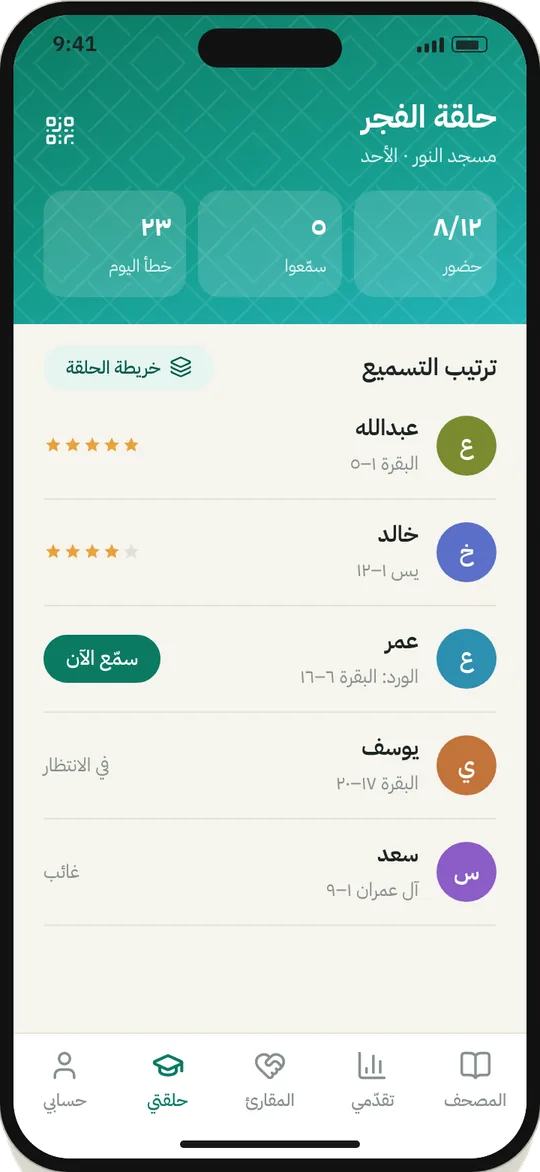
Your halaqat in your pocket
Your circles, their times and their students, each student's plan and daily portion, and their mistakes sent straight to their phone.
How to run your halaqa →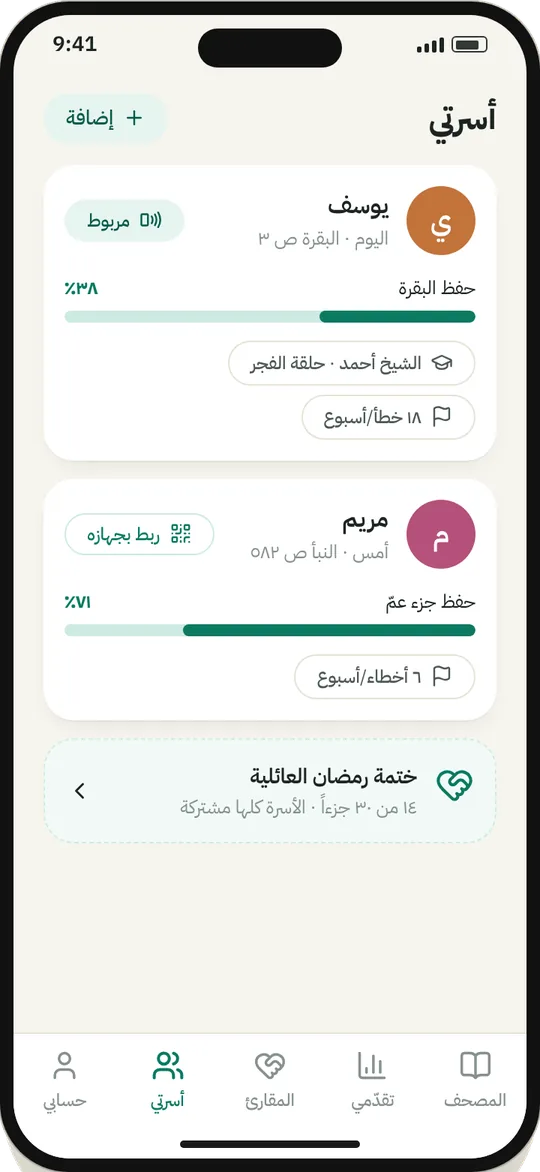
Follow your family's hifz
A profile for each child. Listen to them at home, follow their progress, and see what their teacher marks.
How to follow your children →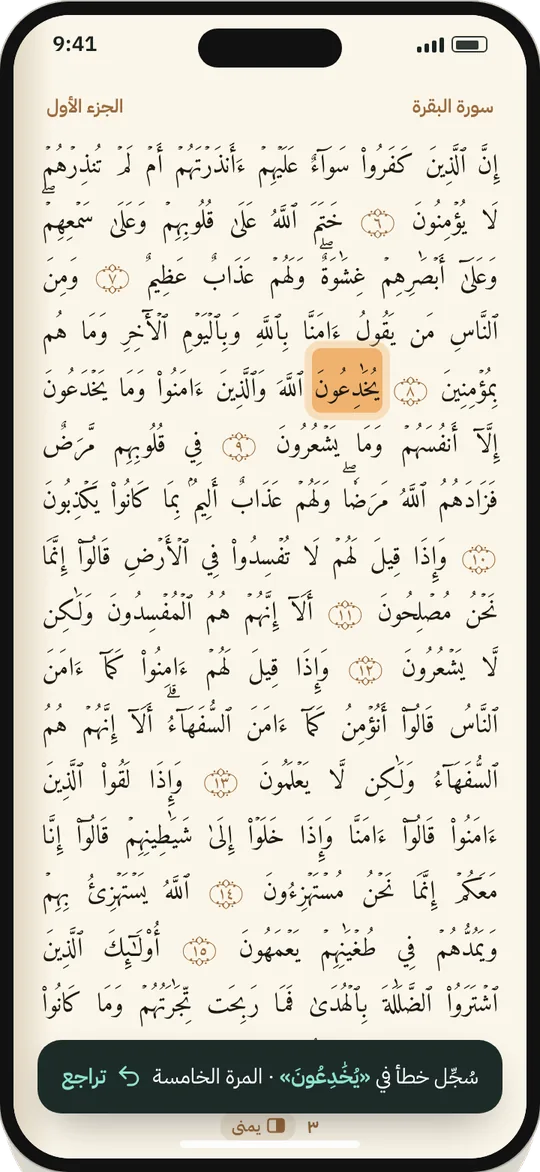
Memorize, revise, mark your mistakes
Mark your mistakes on the mushaf and draw on it as you would with a pen, then revise the places you actually stumble.
How to revise →- FreeEvery feature, with no subscription and no ads
- Easy on the eyesA calm night mode and a font size that suits you
- The Madinah MushafThe 1405 and 1441 prints, page for page and line for line
- No accountNo email, no phone number. You're anonymous from the start
All your halaqat in your pocket
No more notebooks, loose papers or trying to remember who reached where. Each halaqa has its students and its schedule, and each student has a plan, a daily portion and their mistakes.
- As many halaqat as you need, each with its own days and time, and a reminder before it starts.
- A join code you give your students, so they add themselves from their own phones.
- A recitation order for every session, so you always know who's next.
- A plan for each student: new memorization, revision, a khatma for ijazah, or correcting their recitation, each with its own daily portion.
- Mark a student's mistakes while they recite. They see them on their phone and revise them at home, and they can filter to just the mistakes from your halaqa.
Follow your children's hifz from your phone
Make a profile for each child and listen to them at home. What you mark reaches their phone, and what their teacher marks in the halaqa reaches yours.
- Each child has their own mistakes, progress and weekly activity, and the teacher they're linked to.
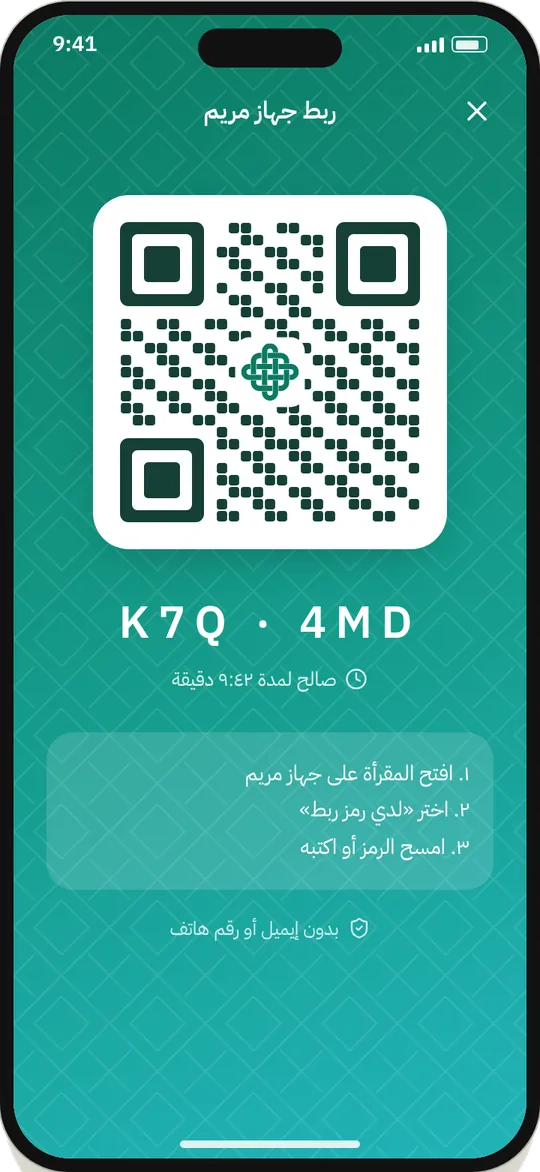
- Link their phone to their profile with a QR code or a six-letter code in a few seconds.
- Before you start, pick who's reciting: you, your child or your student. Every mistake goes to the right person.
Memorize, revise, and mark your mistakes by hand
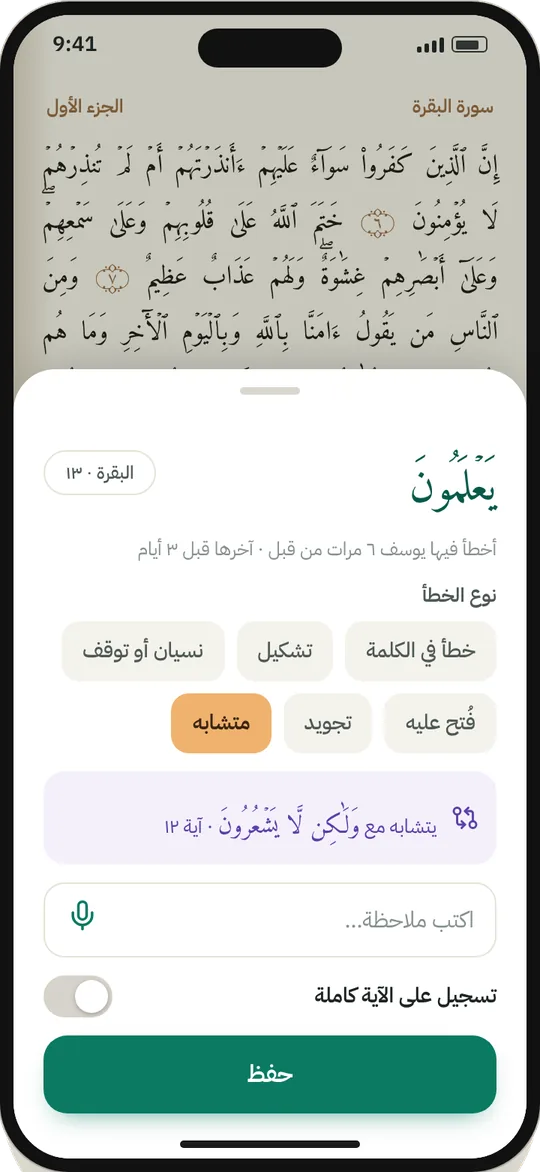
Your mushaf as you know it, except it remembers. A tap on a word records the mistake straight away, and a long press opens the details. The mark stays put until the word is solid.
- Draw on the page with your finger as you would with a pen: underline a word, circle a stop, jot a note in the margin.
- Add a written or voice note to any mistake or verse.
- If the word is one of the mutashabihat, its look-alike shows up right away.
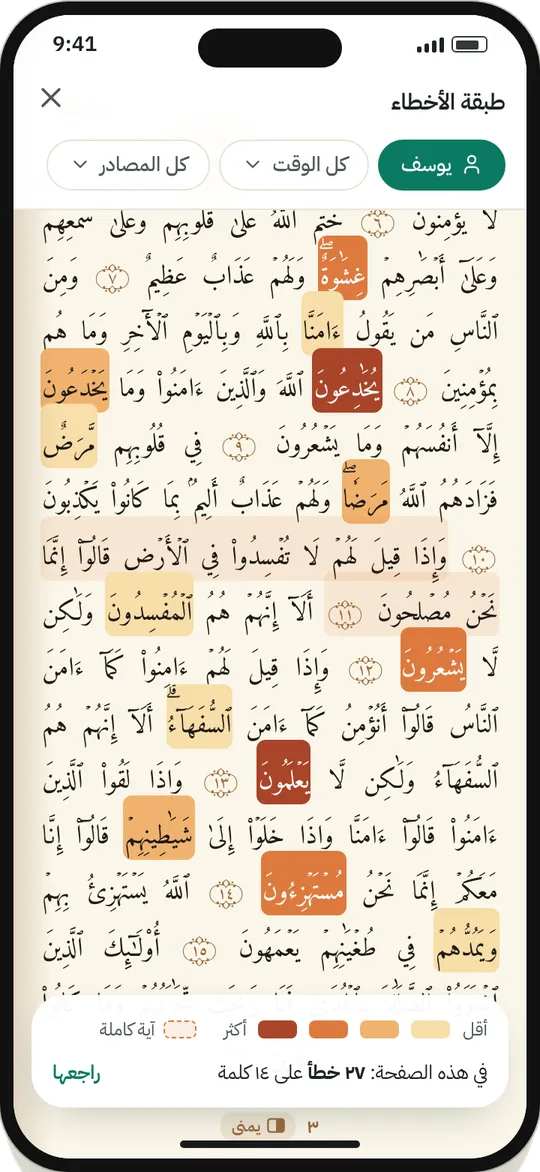
The more often you slip on a word, the darker it gets
Marks are never wiped. They build up with every recitation, so the teacher, the parent and the student all know exactly where the trouble is, and revise that instead of the whole page.
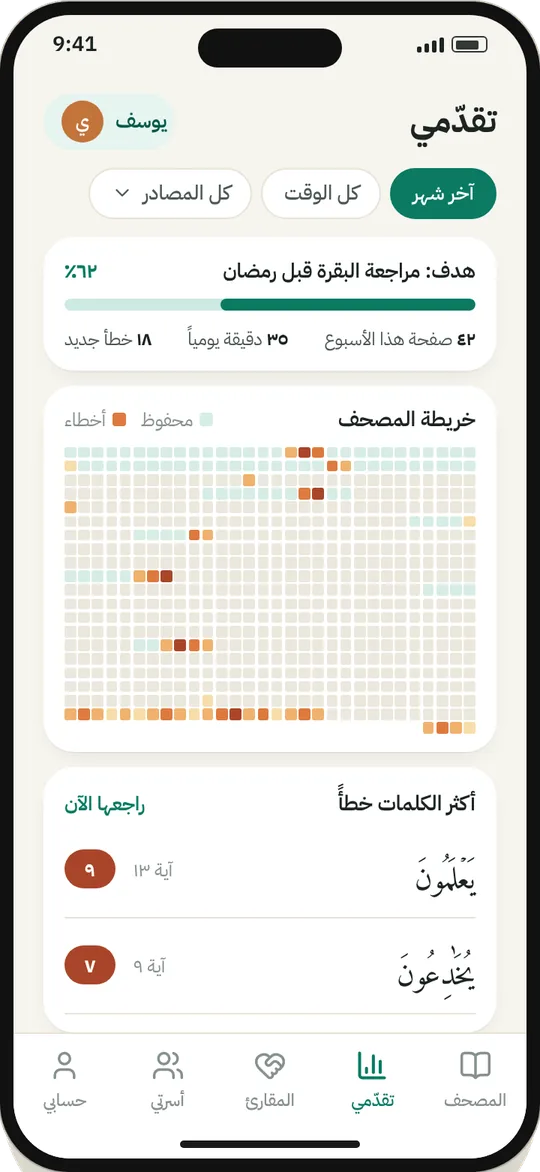
- A list of the words you get wrong most, with a button to revise them now.
- A map of the whole mushaf, all 604 pages, showing where each person stands.
- And an anonymous map of everyone's mistakes, showing the places most people stumble.
No one to listen? Recite to the app
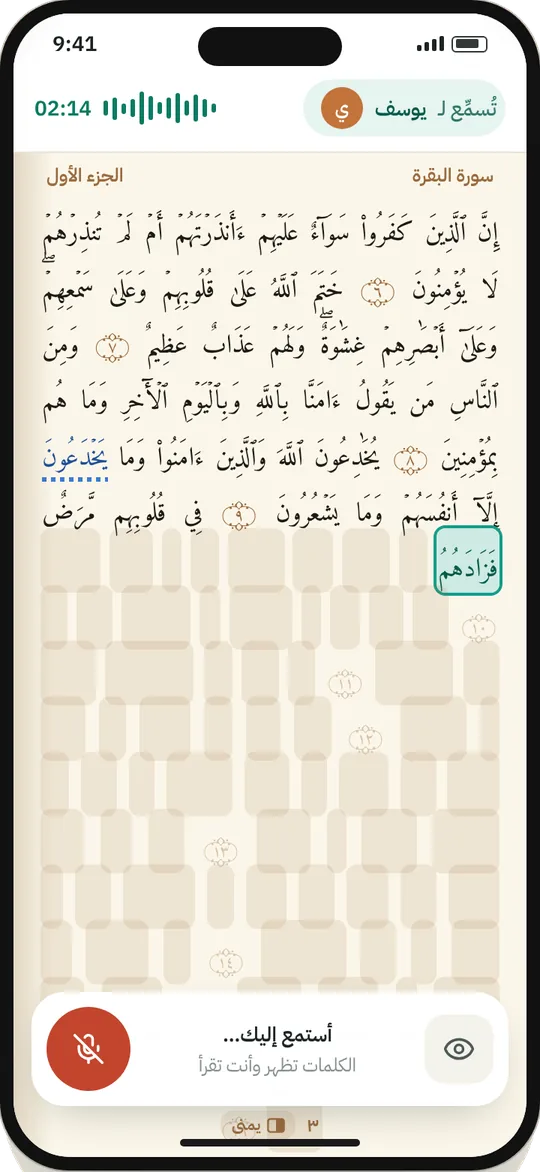
Tap the microphone and start. The app finds the page on its own and follows you word by word with a soft highlight.
- When reciting from memory the verses are hidden, and the words appear one by one as you go.
- When you finish, your mistakes are marked on the page automatically, in the same place your teacher marks them.
- A second model double-checks every mistake before it's saved, so you aren't marked for something you got right.
One khatma that brings everyone together
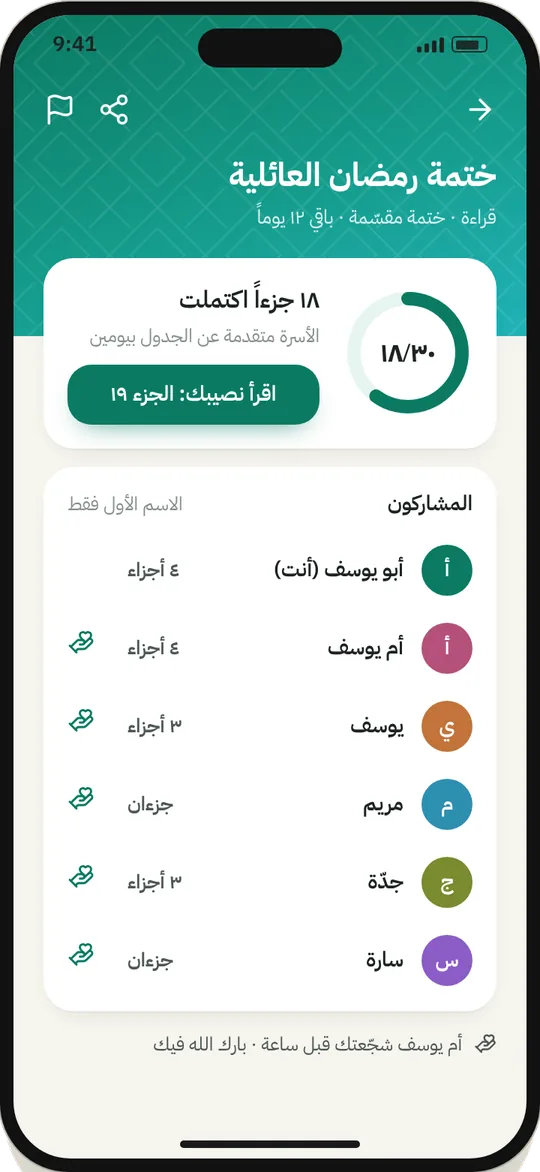
Start a group for your family, your friends or your halaqa, for a shared khatma or a daily portion.
- An invite code you share, so anyone you want can join.
- Each member's share of the khatma, and their progress for everyone to see.
- A nudge for anyone falling behind, and a moment to celebrate when you finish.
Your mistakes are yours alone
Only you and the people you link yourself, your children or your teacher, can see them. Anything that leaves your phone is your choice.
Everything runs on the device. Nothing is uploaded unless you turn on sync.
We never ask for your name, email or phone number.
Sync, contributing to the public map and helping improve recitation checks are each a separate choice.
From inside the app, across all your devices and the cloud, in one go.
Get started before Ramadan
Completely free. Available now for Android, and coming soon to Google Play and iPhone.

Frequently asked questions
Is it really free?
Yes. Halaqat, following your children, marking mistakes, the heat map, reciting by voice and group khatmas are all free, with no subscription and no ads.
Do I need to create an account?
No. The app opens straight away with an anonymous account on your phone, with no email and no phone number. If you want to move your data to another phone or link your children, turn on sync from inside the app.
Is the app in English?
Not yet. The app itself is in Arabic for now, while this site is available in both languages.
Does it work offline?
Yes. Reading, marking mistakes and the heat map all work on the phone without internet. Reciting by voice, sync, halaqat and group khatmas need a connection.
Which mushaf does it use?
The Madinah Mushaf in the Hafs narration, 15 lines and 604 pages, in both prints: 1441 (the latest) and 1405. You choose the one you memorize from in the settings, and your mistakes show in both because they're saved on the word itself.
How do I link my child's or student's phone?
From their profile in the app, create a QR code or a six-letter code that's valid for ten minutes. They scan it on their phone and the profile moves there, and whatever either of you marks reaches the other.
Can the app get my mistakes wrong when I recite by voice?
It can happen, which is why a second model checks every mistake before it's saved. At the end you get the page to review: remove anything you don't think is a mistake, and add anything it missed.
When is it coming to iPhone?
We're starting with Android before Ramadan, then iPhone after it, in sha' Allah. Follow us to hear the moment it's out.